FAQ
Frequently Asked Questions
RBR Roadbook Reader App
- How to scroll the roadbook?
- What is the "Autoscroll"?
- How to adjust/reset the odometer?
- Roadbook "countdown style"?
- Roadbook tulip/notes zoom (magnifier)
- How to lock screen roatation/touch?
- How to adjust the tripmeter?
- Speed limit zones, speeding
- What to do if lost (using go-to-note)?
- Miss or skip a waypoint
- Waypoints
- Auto-adjust Odometer
- Sounds
- About GPS: precise, fast, external?
- Using the RBR app offline
- Results or replay not showing up
- Device swapping during a ride
Riding roadbooks and GPX trails
Participate in the Event
Managing Tracks/Roadbooks
- How to create your first Digital Rally Roadbook?
- What should be considered when designing track/roadbook?
- STOP sign: special waypoint vs. traffic-sign drawing
- How do I add/upload a track (Roadbook or GPX trail)?
- Can I edit and re-upload a roadbook? Will results recalculate?
- How do I export a roadbook from Rally Navigator?
- How to share tracks?
- How does "Navigate by" work?
- Can I add waypoints to a GPX trail track?
- What is a Track/Roadbook PIN code?
- Access: Public, unlisted, private Track/roadbook visibility?
- Track structure errors
Organizing Events
- Can I use RBR as the event platform for my own rally business or club?
- How do I organize my first event?
- How do the payments and entry fees work?
- Event itinerary: classes, sections (tracks) explained
- Why can’t I change a competitor’s class after they’ve started riding?
- Can the same section behave differently for different classes?
- What is a Selective Section (SS)?
- What is a Rolling Start?
- How can competitors register for an event?
- How and when can competitors access event roadbooks?
- Can I decide during the event who is allowed to start the next section?
- Event Track "visibility" (access) explained
- How to test-ride event tracks and itinerary?
- Can a section be left out of the overall results?
- Nominal Time configuration
- What should be considered when choosing time zones for an event?
- Types of waypoints
- Auto-skipping missed waypoints
- Does the platform validate waypoints?
- What is a prologue?
- What is a Liaison or Road Section?
- Neutralization vs Transfer Zones (and refuelling)
- How to add a DN (neutralization zone)?
- How to set speed limits?
- Speeding penalties
- How do I set the DSS (section) start times?
- How do I record the start time as there will be no referee at the start?
- Start list live fullscreen mode
- Live Tracking
- Event "visibility" explained
- FIM & FIA regulations & Lexicon
How to ride and read the roadbook
Other
Miss or skip a waypoint
Updated
There are two separate systems at work when it comes to waypoints — understanding the difference
is key:
Can I tell from the results if a waypoint was manually validated?
No. The results page only shows whether a waypoint was physically cleared (your GPS trace entered the waypoint's validation radius) or missed. Manual validations you make in the app stay on your device only — they are not recorded on the server and do not appear in the results.
How are waypoint penalties calculated?
After the ride, the server compares your GPS trace against all waypoints on the route. If your trace never entered a waypoint's validation radius, that waypoint is marked as missed and a time penalty is applied.
The penalty amount depends on the waypoint type and is defined by the Event Organizer. Typical default penalties:
So what does "Skip" or "Force Validate" in the app actually do?
It only tells the app: "Stop targeting this waypoint, move on to the next one."
Think of it as a navigation convenience — it lets you continue your ride without the app stuck pointing at a waypoint you've already passed or decided to skip. It does not tell the server you were there.
Riders are responsible for managing waypoint statuses in the app. They decide which waypoints to collect and which to skip. If the rider validates a waypoint by physically entering its validation radius, the app automatically marks it as validated and sets the next waypoint as the target. If the rider misses a waypoint, it is their responsibility to tell the RBR app to target the next waypoint!
Skipping Waypoints in the app:
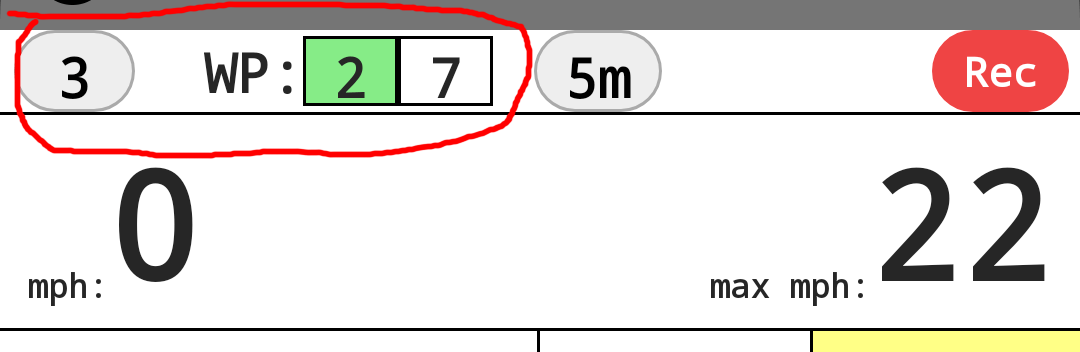
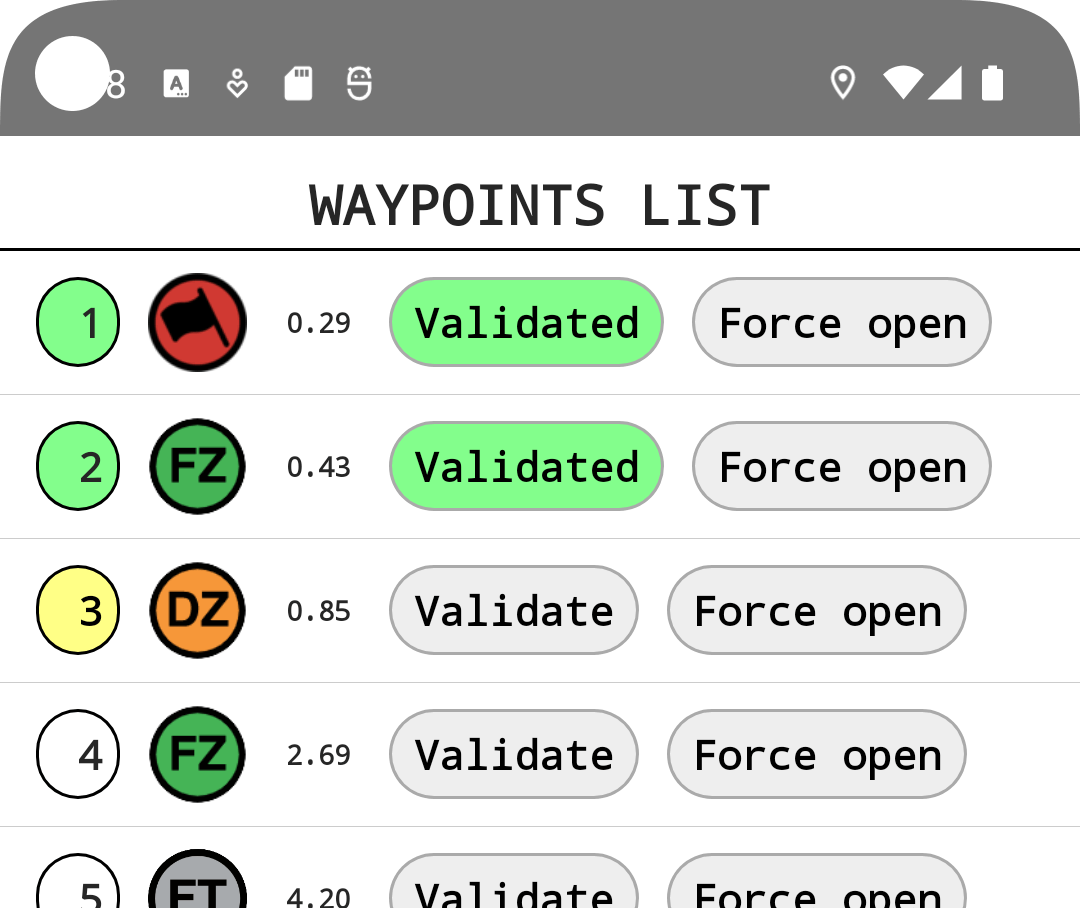
To skip a waypoint, tap the top-left corner of the RBR Roadbook Reader app and mark any waypoint as validated from the waypoint list. If not skipped manually, the app will continue targeting the missed waypoint.
What happens if I miss a waypoint and reach the next one?
The RBR app will detect the omission and show a dialog asking if you'd like to skip the previous waypoint: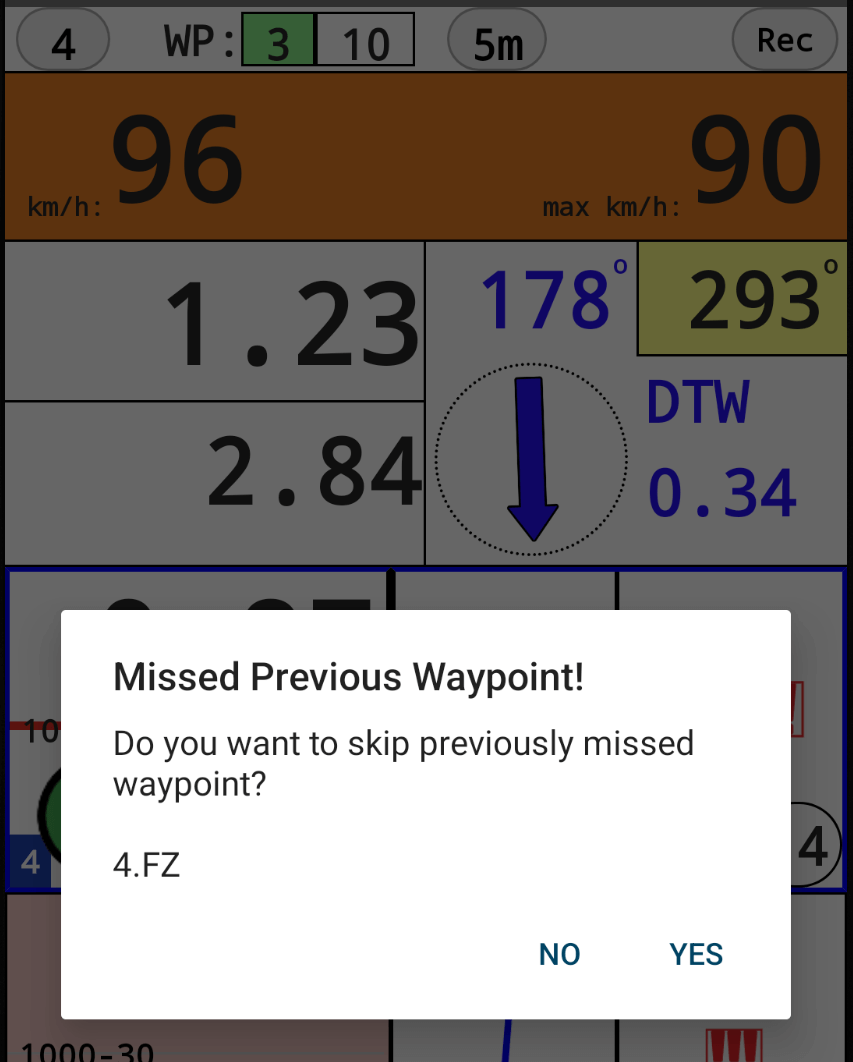
Missed Waypoint Detection:
The app uses an intelligent validation system that determines whether you may have missed a waypoint based on your physical proximity to it and your overall progress along the route. This prevents false alerts in situations where you accidentally or intentionally (e.g. laps) pass or validate upcoming waypoints that are too far along the route and not yet validatable according to the route logic.
Summary:
| RBR App (on your device) | Server (official results) | |
|---|---|---|
| What it does | Controls which waypoint the app is currently targeting and navigating you toward | Analyzes your actual GPS trace to determine which waypoints you physically passed through |
| Affects penalties? | No — skipping or force-validating a waypoint in the app has zero effect on penalties | Yes — penalties are calculated here based on your actual route |
| Affects results page? | No — app actions are not visible in the results | Yes — the results page shows waypoints as "cleared" or "missed" based on GPS data |
Can I tell from the results if a waypoint was manually validated?
No. The results page only shows whether a waypoint was physically cleared (your GPS trace entered the waypoint's validation radius) or missed. Manual validations you make in the app stay on your device only — they are not recorded on the server and do not appear in the results.
How are waypoint penalties calculated?
After the ride, the server compares your GPS trace against all waypoints on the route. If your trace never entered a waypoint's validation radius, that waypoint is marked as missed and a time penalty is applied.
The penalty amount depends on the waypoint type and is defined by the Event Organizer. Typical default penalties:
- WPM, WPS, CP, DZ, FZ, WPV — 15 minutes per missed waypoint
- WPE — 10 minutes
- WPP — 2 minutes
- WPN — 60 minutes
- DSS, ASS, DN, FN, DT, FT — Section Penalty (a larger penalty based on the section distance)
So what does "Skip" or "Force Validate" in the app actually do?
It only tells the app: "Stop targeting this waypoint, move on to the next one."
Think of it as a navigation convenience — it lets you continue your ride without the app stuck pointing at a waypoint you've already passed or decided to skip. It does not tell the server you were there.
Riders are responsible for managing waypoint statuses in the app. They decide which waypoints to collect and which to skip. If the rider validates a waypoint by physically entering its validation radius, the app automatically marks it as validated and sets the next waypoint as the target. If the rider misses a waypoint, it is their responsibility to tell the RBR app to target the next waypoint!
Skipping Waypoints in the app:
To skip a waypoint, tap the top-left corner of the RBR Roadbook Reader app and mark any waypoint as validated from the waypoint list. If not skipped manually, the app will continue targeting the missed waypoint.

*Yellow waypoint number in waypoints list: The app highlights the "open" waypoint number
in yellow if the waypoint is open or if you are within the WP open radius.
What happens if I miss a waypoint and reach the next one?
The RBR app will detect the omission and show a dialog asking if you'd like to skip the previous waypoint:
- If you select No — nothing changes. The app keeps targeting the missed waypoint. The same message will appear again at the next waypoint if the previous one is still missed.
- If you select Yes — the app marks all previous waypoints as validated locally on your device only (for navigation purposes). This does not change the official results on the server. A new message may still appear at the next waypoint if an earlier one remains missed.
Missed Waypoint Detection:
The app uses an intelligent validation system that determines whether you may have missed a waypoint based on your physical proximity to it and your overall progress along the route. This prevents false alerts in situations where you accidentally or intentionally (e.g. laps) pass or validate upcoming waypoints that are too far along the route and not yet validatable according to the route logic.
Summary:
- Skipping or validating in the RBR app = only affects your navigation and which waypoint the app targets next. Not visible in results.
- Penalties = determined by the server based on your actual GPS route, not by what you did in the app.
- Results page = shows cleared/missed waypoints based on GPS data only. There is no indication of manual app actions.
Beta
About BETA
RoadbookRally.com is fully operational and proven in live rally events worldwide.
The BETA label simply indicates that new management features are still being refined and released - not that the system is unstable.
Latest updates → 27 Oct 2026